How do I set up global and personalized discounts in Bundlify?
You can set up both global and personalized (custom) discounts in Bundlify to enhance your “Frequently Bought Together” offers and increase your store’s average order value.
🌐 Global Discount
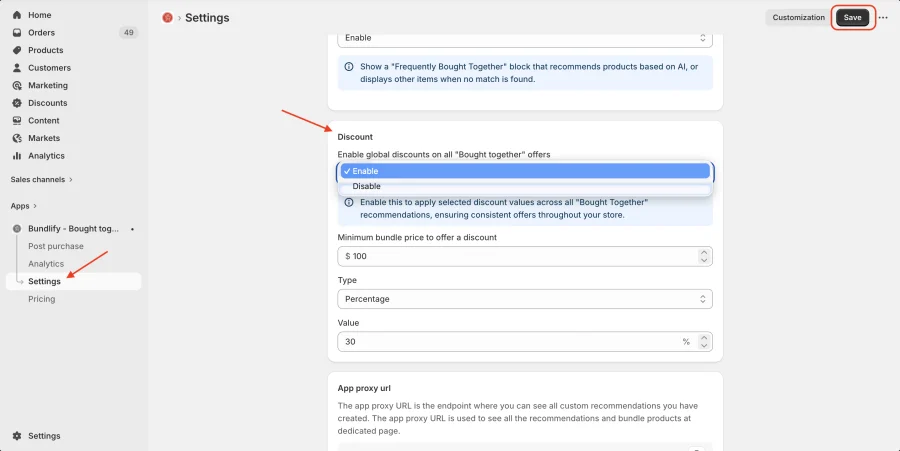
The Global Discount applies across all products using Bundlify.
How to set it up:
- Go to the Settings page in the Bundlify app
- Configure your preferred discount (percentage or fixed)
- Save the settings
This will automatically apply the discount to all eligible bundle offers.
🎯 Personalized (Custom) Discount
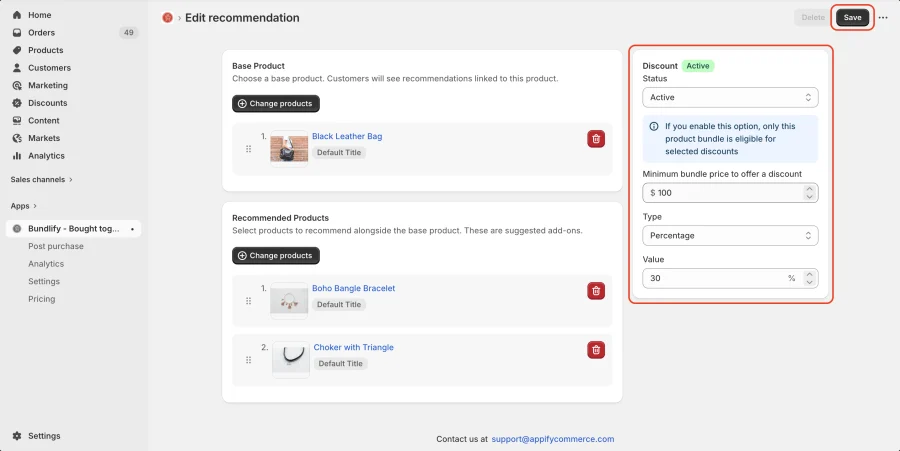
The Personalized Discount allows you to set specific discounts for individual products.
How to set it up:
- Go to the Product Edit page inside the Bundlify app
- Select the product you want to customize
- Set a custom discount for that specific bundle
- Save your changes
This helps you create targeted offers based on product strategy.
💡 Tip: Use global discounts for consistency and personalized discounts for high-impact or strategic products.
Get Bundlify app for your Shopify store from here Bundlify - Bought together