How to Change the Language of the App Admin Panel?
The Bundlify – Bought Together app supports multiple languages in the admin panel to provide a better and more comfortable user experience.
🌐 Automatic Language Detection
By default, the app matches the language of your Shopify admin account. Click your profile picture in the bottom-left corner of Shopify admin, go to “My Profile”, and pick a language from the “Language” dropdown. The Bundlify admin updates automatically. This is your staff account language, not your storefront language.
🔧 Manual Language Change (Optional)
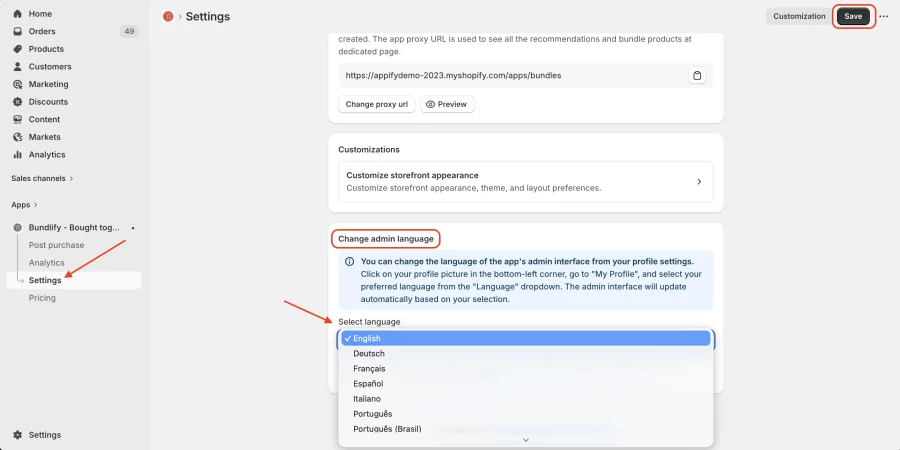
If you want to use a different language than your store’s default, you can manually change it by following these steps:
- Go to the Bundlify App → Settings
- Find the “Change Admin Language” section
- Under “Select language”, choose your preferred language from the dropdown
- Click “Save”
Once saved, the admin panel will be updated to your selected language. This setting affects only the Bundlify admin, not your storefront.
Get Bundlify app for your Shopify store from here Bundlify - Bought together