What are the Advanced SEO settings and how do they work?
The Advanced SEO settings add your product questions and answers to the page source as structured data (FAQ schema). Structured data helps search engines understand the Q&A on your product pages.
The feature is available on the Professional plan.
How to set it up
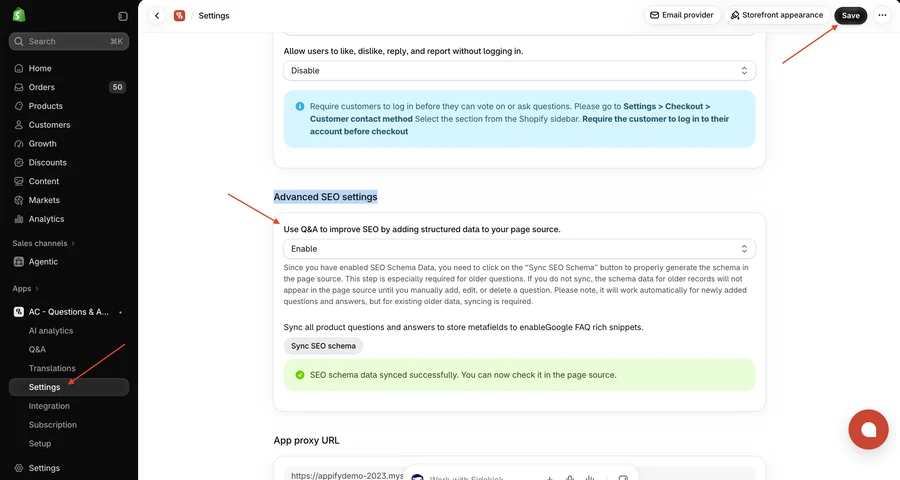
- In the app, go to Settings and find the Advanced SEO settings section.
- Set Use Q&A to improve SEO by adding structured data to your page source to Enable.
- Click Save in the top-right corner.
- Click Sync SEO schema. Keep the app open until you see "SEO schema data synced successfully".
- Open a product page on your store, view its page source and check that the schema is there.
Why do I need to click Sync SEO schema?
Syncing copies your existing questions and answers into your store's metafields, where the schema is built from. New questions are added by themselves. Older questions only appear in the schema after you sync, or after you add, edit or delete a question. Syncing can take a while if you have many questions.
Good to know
- Use only one SEO method. The app has a second option, Use FAQ Q&A for SEO by adding structured JSON data to the header, in the Storefront settings section. You cannot turn on this one while that one is on. To compare the two, see SEO via Headers vs SEO via Page Source.
- Structured data helps search engines read your Q&A, but it does not guarantee rich results. Google decides when to show them and shows FAQ rich results for only a few kinds of sites.
Get the app from here for your shopify store AC - Questions & Answers