How do I enable multi-language support for the Cookie Consent banner?
Cookiefy - Privacy Policy supports multi-language translations so your banner can display in your visitors' preferred language. Translations are included in the Advanced plan.
How It Works
- The banner automatically detects the visitor's browser language and displays the consent message in the matching language (if configured).
- You can manually add translations for any language you want to support.
- If no translation is available for a visitor's language, the banner falls back to your default language.
Setting Up Translations
- Log in to your Appify Commerce dashboard.
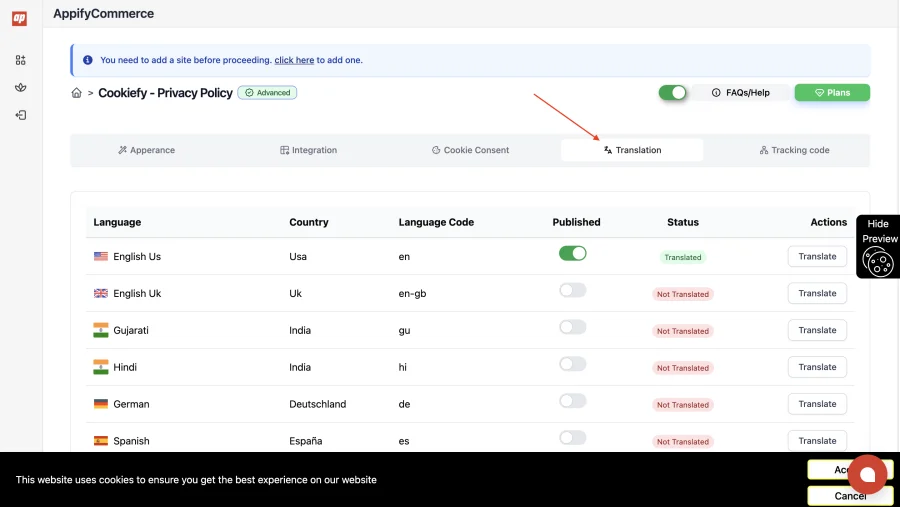
- Go to Cookiefy - Privacy Policy → Translation (Advanced plan).
- Switch On each language you want to serve.
- Open a language and translate the following fields:
- Consent message text
- Link text
- Accept button text
- Cancel button text
- Click Save to apply translations.
Supported Languages
Fourteen languages are available:
- English (US), English (UK), Gujarati, Hindi, German, Spanish, French, Italian, Japanese, Dutch, Polish, Portuguese, Chinese (Simplified) and Chinese (Traditional).
Other languages are not available yet.
tip
If your website serves visitors from multiple countries, adding translations for your top visitor languages significantly improves user experience and compliance rates.