The Two Biggest Shopify Image Zoom Apps Just Got Delisted — Here's the Alternative With a 30-Day Trial

👉 Fix your store's ZoomMaster App now: Install ZoomMaster on the Shopify App Store →
If you've been searching for an image zoom app on the Shopify App Store lately, you may have noticed something: the two most popular options are gone.
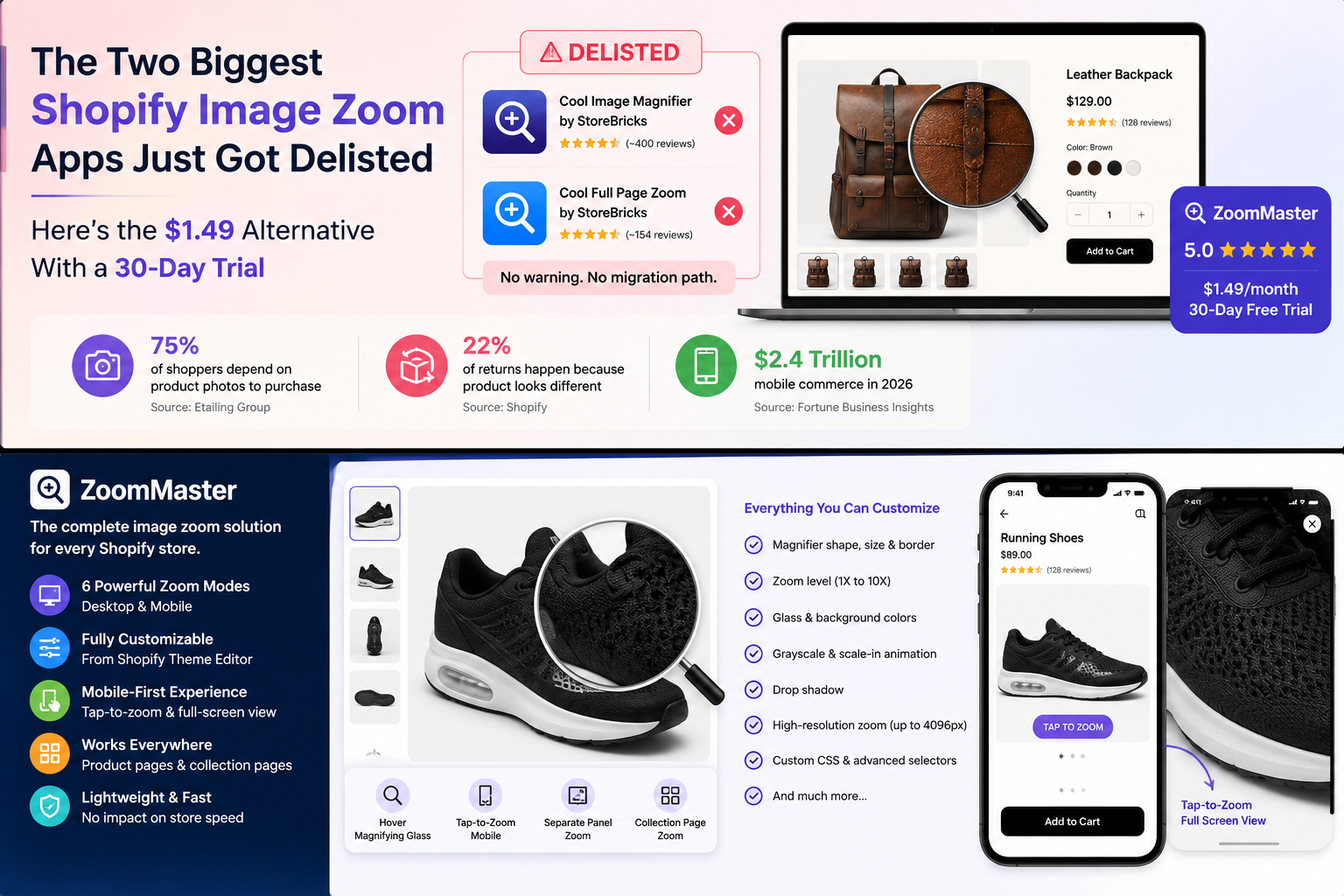
"Cool Image Magnifier" by StoreBricks (~400 reviews) and "Cool Full Page Zoom" (~154 reviews) — both delisted. No warning. No migration path. Merchants who relied on them are scrambling for alternatives.
Meanwhile, product photography has never mattered more. 75% of online shoppers depend on product photos when deciding on a potential purchase (Etailing Group), and 22% of returns happen because the product looks different than expected (Shopify). When customers can't zoom in to examine texture, stitching, labels, or fine details, they either don't buy — or they buy and return.
ZoomMaster is still here, still 5.0★, and is the only dedicated zoom app in the category carrying a Built for Shopify badge — with a 30-day free trial that's 2-4x longer than any competitor. Here's why merchants are switching.
What Happened to the StoreBricks Zoom Apps?
As of mid-2026, both "Cool Image Magnifier" and "Cool Full Page Zoom" by StoreBricks are no longer available on the Shopify App Store. The listings return errors or redirect to the general App Store.
For merchants who had these apps installed, this creates several problems:
- No updates — if Shopify releases a theme update that breaks the zoom widget, there's no fix coming
- No support — open tickets go unanswered
- Potential security risk — unmaintained apps can become attack vectors
- Theme extension deprecation — Shopify is migrating to Theme App Extensions; legacy script-tag apps will eventually stop working
If you're still running a delisted zoom app, it's time to migrate — before it breaks.
Why Product Image Zoom Still Matters in 2026

The data on product images and conversion
- 75% of shoppers depend on product photos to decide whether to purchase (Etailing Group)
- Products with high-quality zoomable images see up to 30% higher add-to-cart rates compared to standard static images (BigCommerce research)
- 22% of online returns happen because the product "looked different than expected" (Shopify)
- Mobile commerce reached $2.4 trillion in 2026 (Fortune Business Insights) — tap-to-zoom is no longer optional
Why Shopify's built-in zoom isn't enough
Most modern Shopify themes include basic hover zoom. But it's limited:
- Fixed zoom level — can't adjust magnification from the theme editor
- No magnifying glass — just an inline zoom with no visual indicator
- No mobile zoom — many themes disable zoom entirely on mobile
- No collection page zoom — only works on product pages
- No customization — can't change lens shape, size, border, or animation
- Theme-specific bugs — third-party themes often have broken or conflicting zoom implementations
A dedicated zoom app gives you control over the experience across every theme and device.
ZoomMaster: Full Feature Breakdown
Zoom modes
| Mode | How it works | Where |
|---|---|---|
| Hover magnifying glass | Classic magnifier follows cursor over product images | Desktop |
| Tap-to-zoom mobile | Full-screen overlay popup with high-res image on tap | Mobile |
| Tap-to-zoom desktop | Click expands image inline (replaces hover mode) | Desktop |
| Click-to-open magnifier | Floating icon button toggles magnifier on/off | Desktop |
| Separate panel zoom | Opens zoomed view in a dedicated panel to the right | Desktop (wide screens) |
| Collection page zoom | Works on product cards in collection grids | Desktop + Mobile |
Customization (all from Shopify Theme Editor — zero code)
| Setting | Options |
|---|---|
| Magnifier shape | Circle or Square |
| Zoom level | 1X to 10X (step 1) |
| Glass size | 0–500px (step 5) |
| Border size | 0–20px |
| Border color | Any color (picker) |
| Background color | Any color (for PNG transparency) |
| Drop shadow | On/off |
| Grayscale animation | On/off (dims image outside magnifier) |
| Scale-in animation | On/off (glass appears with animation) |
| Zoomed image resolution | 600px / 1024px / 2048px / 4096px (highest) |
| Custom CSS | Free-form textarea |
| Advanced selectors | Override image/thumbnail CSS selectors for custom themes |
Mobile-specific features
- Tap-to-zoom button — animated "TAP TO ZOOM" pill appears on product images, auto-fades after 5 seconds
- Full-screen overlay — tapping opens a scrollable high-res image with close button
- Touch-optimized — passive touch listeners for smooth scrolling, no scroll jank
- Width detection — automatically switches to mobile mode at ≤800px viewport width
Theme compatibility
ZoomMaster has hard-coded CSS selectors for 50+ Shopify themes including Dawn, Debut, Brooklyn, Broadcast, District, Artisan, Atlantic, Avenue, Blockshop, California, Simple, and dozens more.
For edge cases, there are 156+ per-store custom override files — real-world implementations for stores with unusual DOM structures.
The app also:
- Auto-detects themes via
Shopify.theme.nameat runtime - Falls back to MutationObserver if the theme isn't in the known list
- Handles SPA navigation — intercepts
pushState,replaceState,popstate, andhashchangefor variant switches - Disables conflicting zoom widgets from other apps (Magic Zoom, Drift, PhotoSwipe)
Pricing: The Category's Best Value
| App | Price | Trial | Rating | Status |
|---|---|---|---|---|
| ZoomMaster | $2.99/mo (or $24.99/yr) | 30 days | 5.0★ (6 reviews) | ✅ Active |
| Cool Image Magnifier (StoreBricks) | $2.99/mo | 7 days | 4.5★ (~400 reviews) | ❌ Delisted |
| Cool Full Page Zoom (StoreBricks) | $2.99/mo | 7 days | 4.6★ (~154 reviews) | ❌ Delisted |
| GG Image Zoom PRO | $8.99/mo | 7 days | 4.7★ | ✅ Active |
| Magic Zoom Plus | $69 one-time | N/A | 4.5★ | ✅ Active |
ZoomMaster is:
- Longest free trial in the category (30 days vs the 3–7 days competitors offer)
- Longest free trial (30 days vs 7 days)
- Highest rated (5.0★ with 100% five-star reviews)
- Only remaining option from an active Shopify partner with live support
Performance: Zoom Without Slowing Your Store
Image zoom apps can destroy your Core Web Vitals if they load high-res images upfront. ZoomMaster avoids this:
How ZoomMaster stays fast:
- Deferred script loading —
<script defer>ensures the zoom script never blocks page render - Lazy high-res preloading — the zoomed image only loads when a user hovers/taps, not on page load
- Configurable resolution cap — choose 600px, 1024px, 2048px, or 4096px max zoom resolution. Lower caps = faster loads for stores with many images
- Shopify CDN delivery — zoom script served through Shopify's own asset pipeline
- MutationObserver for variants — watches for image source changes on variant selection instead of re-loading the entire widget
This means: zero impact on Largest Contentful Paint (LCP) and zero impact on Total Blocking Time (TBT) — the two metrics that matter most for Core Web Vitals and Google rankings.
What Merchants Are Saying
"Great tool to show the details of our items!" — Africa Direct, United States (5★, 2 years using the app)
"My issue was quickly resolved. 10/10" — Try Modest Limited, United Kingdom (5★, 6 months using the app)
"Magnifying glass wasn't working on variations. However, they quickly fixed the issue after I asked." — SurrAround, Australia (5★, 4 months using the app)
Every single review (7/7) is 5 stars. The pattern: fast support, quick fixes for edge-case themes, and "it just works."
Setup Guide (Under 5 Minutes)
- Install ZoomMaster from the Shopify App Store — 30-day free trial, no credit card required upfront
- Open your theme editor — Online Store → Themes → Customize
- Enable the app embed — App Embeds section → toggle ZoomMaster ON
- Adjust settings — choose magnifier shape, zoom level, glass size, and other options
- Preview and save — hover over any product image to test
That's it. No code. No developer. Works immediately on product pages and (optionally) collection pages.
FAQ
Will ZoomMaster work with my theme?
Very likely. ZoomMaster has built-in compatibility with 50+ Shopify themes and auto-detection for unknown themes via MutationObserver. If your theme has unusual image markup, advanced CSS selectors let you manually target the correct elements — or contact support for a free custom override.
Does the zoom work on mobile?
Yes. You can enable mobile zoom in two ways: the traditional magnifying glass (works on mobile touch) or the dedicated tap-to-zoom mode (full-screen overlay with high-res image). Tap-to-zoom is recommended for mobile as it provides a better UX for touchscreens.
Will it slow down my store?
No. ZoomMaster loads its script with defer (non-blocking) and only preloads high-res images when a user actually hovers or taps. It has zero impact on initial page load speed and Core Web Vitals.
Can I use it on collection pages?
Yes. Enable "Display on collection page" in the settings. The magnifier will work on product card images in your collection grids — letting shoppers zoom without clicking into the product page.
What zoom level should I use?
For most products, 2X–3X is ideal. Use higher zoom (5X–10X) for products with fine details: jewelry, electronics, fabric patterns, artwork, or printed text. The range slider in the theme editor lets you dial in the perfect level.
Can I try it before paying?
Yes. ZoomMaster offers a 30-day free trial — the longest in the image zoom category. No credit card required upfront. Full access to all features.
The Bottom Line
The Shopify image zoom category just lost its two most popular apps. Merchants running delisted zoom apps are one theme update away from a broken product page.
ZoomMaster is the category's best remaining option: $2.99/month (or $24.99/year), a 30-day free trial, a 5.0★ rating, a Built for Shopify badge, 50+ theme compatibility, mobile tap-to-zoom, and zero impact on page speed.
For $2.99 — less than a cup of coffee — your customers can zoom into fabric weave, jewelry details, electronics ports, label text, and every fine detail that turns a "maybe" into an "add to cart."
Ready to add zoom to your product images?
Try ZoomMaster Free for 30 Days →