How can I manage review interactions and submission permissions in my Shopify store?
You can customize how users interact with reviews and who can submit them by adjusting settings in the AC - Reviews & Ratings app.
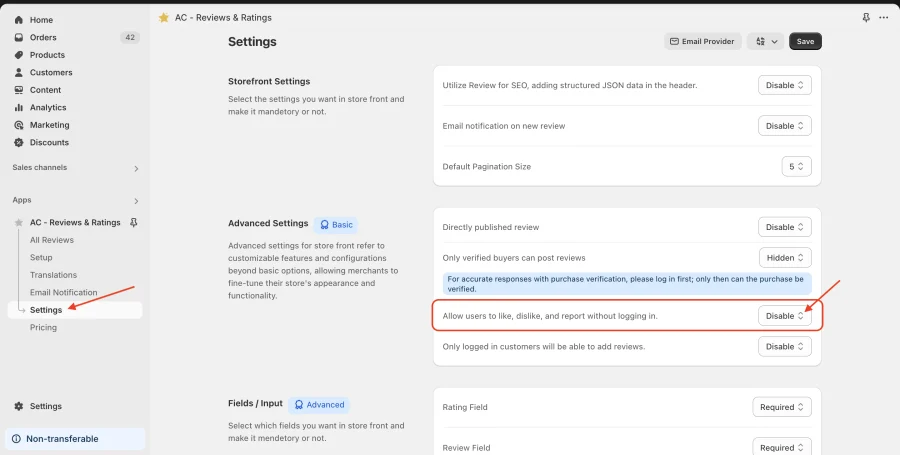
1. Allow users to like, dislike, and report reviews without logging in:
- Open the AC - Reviews & Ratings app.
- Navigate to Settings > Advanced Settings.
- Locate the option “Allow users to like, dislike, and report without logging in.”
- Enable or disable it based on your preference.
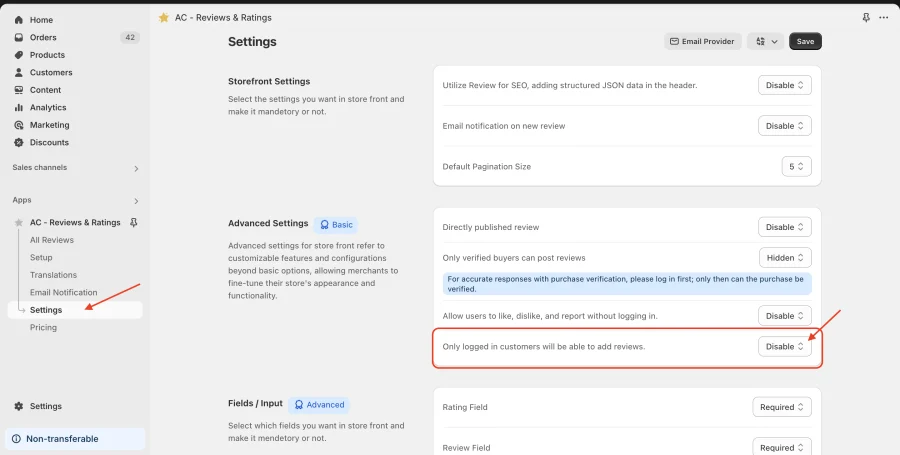
2. Restrict review submission to logged-in customers only:
- Open the AC - Reviews & Ratings app in Shopify.
- Go to Settings > Advanced Settings.
- Find the option “Only logged-in customers will be able to add reviews.”
- Enable this setting to restrict reviews to logged-in users.
These settings help you control review authenticity and engagement on your store.
Note: Both settings are available on the Basic and Advanced plans and are disabled on the Free plan. The Like, Dislike and Report buttons on the storefront are an Advanced plan feature.
Get Review & Rating App from here for your shopify store Review and Rating App