How do I set up the Bizify - WhatsApp Chat App?
To set up the Bizify - WhatsApp Chat App, follow these steps:
- Install the app from the “Shopify App Store”.
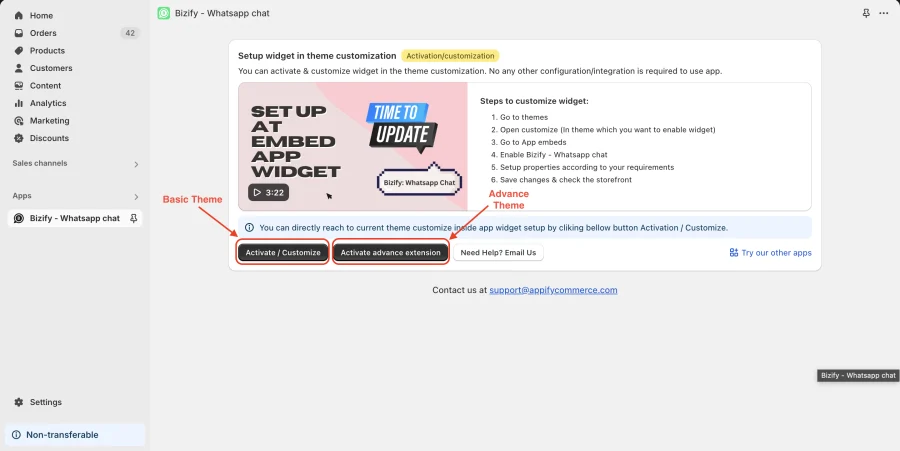
- On the app dashboard click Configure Widget. This opens the Shopify Theme Editor on the App embeds tab.
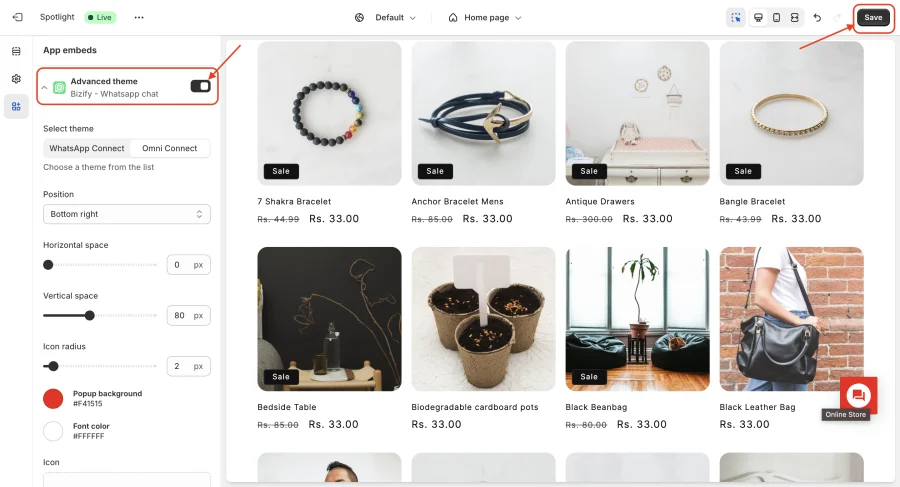
- Turn on either the Basic theme or the Advanced theme app embed (Advanced offers the WhatsApp Connect and Omni Connect layouts) and customize the widget settings.
- Click Save in the Theme Editor and the chat widget will be active on your store.
You can install Bizify - Whatsapp chat in Shopify store from here.
info
Contact Us at support@appifycommerce.com