Where and how can I view the forecast in the Predictify App for my Shopify store?
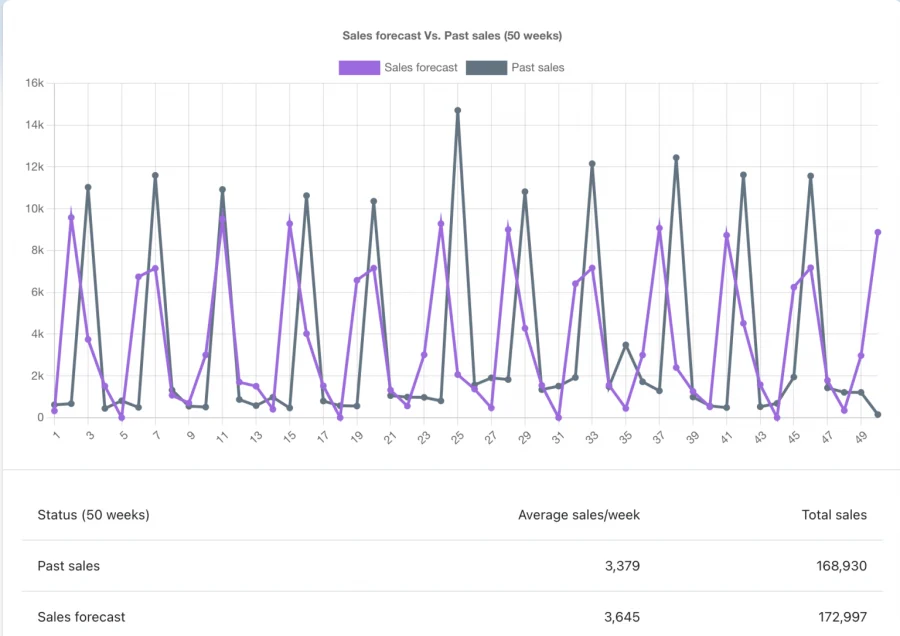
Predictify does not show a forecast the moment you open it. After installation the app first collects your store's order history and then runs its forecasting model on that history. Until both steps finish, opening the app shows a screen telling you that your previous order history is being collected. Once the forecast is ready, the app's home page shows an announcement banner and a chart, each presenting a forecast for overall store sales for the next fifty weeks.
- Through a banner, we will display whether store sales are expected to rise, fall, or remain neutral next week compared with the current week, along with the expected percentage change. The full fifty-week outlook is shown in the chart and the status table below it.
for further reference please study the given below screenshot.

The chart allows you to compare past sales and forecast sales figures. Additionally, you will be able to compare weekly total sales with weekly forecasted sales.
Note:- For forecasting, we need at least a year’s worth of data.
Get Predictify app for Shopify store from here Predictify App